
Running Agents
Overview
OpenClaw agents are not one execution mode anymore.
Direction note:
- OpenClaw plus the orchestrator bridge (
/orch) is now the preferred daily front door for launch and bounded read surfaces /operatorremains the local specialist console when you need richer repo-native drill-downs such as runs, approvals, incidents, and agent readiness- raw
POST /api/tasks/triggerremains the lowest-level protected contract
Use these terms separately:
spawned-worker capable: the orchestrator can invoke the agent task lane by spawningsrc/index.tsserviceAvailable: the repo contains a long-runningsrc/service.tsimplementationserviceExpected: the current host/runtime contract expects that agent to be covered by a persistent systemd unitserviceInstalled/serviceRunning: host-proven unit truth, not manifest guesses
Current runtime truth:
- most agents are still worker-first
- only
doc-specialistandreddit-helperare currently service-expected - only
doc-specialistandreddit-helpercurrently keep real residentsrc/service.tsentrypoints; the rest run through orchestrator task execution only
The operator truth source for this distinction is:
GET /api/agents/overview
GET /api/health/extended
Where Agents Can Work
The current runtime assumes target repos live inside the workspace tree.
Recommended layout:
workspace/
  projects/
    client-a/
    client-b/
Use task scopes relative to the workspace root, for example:
projects/client-aprojects/client-a/srcprojects/client-a/app/page.tsx
Do not assume agents can safely reach arbitrary repos elsewhere on disk. The current permission model is intentionally bounded around workspace.
Lifecycle Modes
Worker-first
Worker-first agents are routed through orchestrator tasks. Their service entrypoint may exist in-repo, but host service coverage is not currently a runtime requirement.
Examples:
build-refactor-agentsystem-monitor-agentsecurity-agentqa-verification-agent- the rest of the current task portfolio outside
doc-specialistandreddit-helper
Service-expected
These agents are expected to have persistent host coverage. Today that means:
doc-specialistreddit-helper
For those lanes, a healthy runtime story includes:
serviceExpected=true- a real
serviceUnitName - host-visible
serviceInstalledandserviceRunningtruth - incident/reporting coverage when the unit is missing or stopped
Task-Driven Invocation
// Representative worker-first invocation path
const result = spawn('tsx', [
  'src/index.ts',
  '--payload', payloadPath
], {
  cwd: agentDir,
  stdio: ['pipe', 'pipe', 'inherit']
});
The orchestrator:
- Prepares a JSON payload in
/tmp - Spawns the agent with
--payload /tmp/payload-123.json - Collects stdout (JSON result)
- Saves result and updates state
This remains the main execution path for most agents.
Agent Configuration
Each agent keeps its runtime contract in:
cat agents/<agent-id>/agent.config.json
cat agents/<agent-id>/SOUL.md
Pay special attention to:
orchestratorStatePathserviceStatePath- allowed skills / model settings
- whether the agent is treated as service-expected by current orchestrator runtime policy
For the public repo's local-first boot path, orchestratorStatePath now defaults to ../../orchestrator/data/orchestrator-state.json in the agent manifests. If you override runtime state with STATE_FILE or ORCHESTRATOR_CONFIG, spawned agents should inherit that same override so the agent lane reads the same control-plane truth as the orchestrator.
What Each Agent Produces
Use this as the practical day-one map:
doc-specialist/drift-repairOutput: knowledge packs inlogs/knowledge-packs/plus run evidence in/operator/runsreddit-helper/reddit-responseOutput: drafted replies inlogs/reddit-drafts.jsonl, queue payloads inlogs/devvit-submissions.jsonl, and run evidence in/operator/runscontent-agent/content-generateOutput: generated content in the task run result; check/operator/runsfirst because this lane does not usually create a named artifact filedata-extraction-agent/data-extractionOutput: extracted record/entity summaries, coverage, and tool evidence in/operator/runsnormalization-agent/normalize-dataOutput: normalized result summary in/operator/runssummarization-agent/summarize-contentOutput: summary result in/operator/runsmarket-research-agent/market-researchOutput: findings, source-plan evidence, and fetch results in/operator/runsqa-verification-agent/qa-verificationOutput: verification trace, closure posture, and test/check evidence in/operator/runs, with related incident history when applicableintegration-agent/integration-workflowOutput: workflow graph, delegation evidence, and stop/closure reasoning in/operator/runsbuild-refactor-agent/build-refactorOutput: real code changes in the scoped repo, plus verification and governance evidence in/operator/runssecurity-agent/security-auditOutput: findings and remediation guidance in/operator/runsskill-audit-agent/skill-auditOutput: governance/audit result in/operator/runssystem-monitor-agent/system-monitorOutput: runtime diagnosis in/operator/runs, with related pressure visible in/operator/system-healthand/operator/incidents
Rule of thumb:
- OpenClaw plus
/orchis the preferred daily entry path logs/*-service.jsonis agent memory, and onlydoc-specialist/reddit-helpershould be treated as resident-service heartbeat sources/operator/runsis the main operator-facing output surfacelogs/matters most for lanes that explicitly write artifacts
Service Recipes
The recipes below are the fastest way to use the system for real delivery work. Launch them from OpenClaw with /orch run <task-type> ..., from /operator/tasks, or through POST /api/tasks/trigger.
The JSON blocks below are representative task payloads.
Client Audit
Use this when a client wants to know whether a site or app is ready for production, risky, or in need of repair.
Task flow:
- Run
security-auditon the target repo scope.
{
  "type": "security-audit",
  "payload": {
    "type": "scan",
    "scope": "projects/acme-site"
  }
}- Run
system-monitorto capture current runtime posture.
{
  "type": "system-monitor",
  "payload": {
    "type": "health"
  }
}- If you want a client-facing written report, run
content-generate.
{
  "type": "content-generate",
  "payload": {
    "type": "operator-notice",
    "source": {
      "name": "Acme Site Audit",
      "description": "Write a client-facing audit summary from the latest security-audit and system-monitor runs for projects/acme-site. Focus on launch risk, major findings, and next steps."
    },
    "style": "client-facing",
    "length": "medium"
  }
}
Expected output:
- security findings and remediation guidance in
/operator/runs - runtime diagnosis in
/operator/runsand/operator/system-health - optional client-facing report text in the
content-generaterun result - no repo mutation unless you later choose to run a repair lane
Scoped Feature Build
Use this when the client wants a bounded feature, redesign slice, or fix inside one known area of the repo.
Task flow:
- Run
build-refactorwith a narrow scope and clear intent.
{
  "type": "build-refactor",
  "payload": {
    "type": "refactor",
    "scope": "projects/acme-site/src/components/Hero.tsx",
    "intent": "Add a clearer call-to-action and tighten mobile spacing without changing unrelated sections.",
    "constraints": {
      "maxFilesChanged": 3,
      "runTests": true
    }
  }
}
If the lane pauses, approve it in
/operator/approvals.Run
qa-verificationagainst the same repo or surface.
{
  "type": "qa-verification",
  "payload": {
    "target": "projects/acme-site",
    "suite": "smoke",
    "mode": "execute"
  }
}
Expected output:
- real code edits in the scoped target repo
- refactor summary and governance evidence in
/operator/runs - approval record in
/operator/approvalswhen the lane is gated - verification trace in
/operator/runs
Notes:
- narrower scopes produce better autonomous edits and clearer review posture
- if your repo already has a preferred verification command, surface it through your task payload or local verification policy before broad use
Handoff Package
Use this when delivery is done and you need to leave behind a readable, operator-friendly project package for the client or next developer.
Task flow:
- Run
drift-repairover the docs or handoff-relevant paths that changed.
{
  "type": "drift-repair",
  "payload": {
    "requestedBy": "operator",
    "paths": [
      "projects/acme-site/README.md",
      "projects/acme-site/docs/deployment.md",
      "projects/acme-site/docs/ops.md"
    ],
    "notes": "Prepare post-delivery handoff knowledge pack for Acme site."
  }
}- Run
summarize-contenton your delivery notes, release notes, or copied run summary.
{
  "type": "summarize-content",
  "payload": {
    "sourceType": "report",
    "content": "<paste delivery notes, release notes, or run-summary text here>",
    "format": "executive_summary"
  }
}- Run
content-generatefor the final handoff narrative.
{
  "type": "content-generate",
  "payload": {
    "type": "readme",
    "source": {
      "name": "Acme Site Handoff",
      "description": "Create a concise developer handoff covering what changed, where the repo lives, how to run it, how to verify it, and the next recommended tasks."
    },
    "style": "technical",
    "length": "medium"
  }
}- If the handoff is meant to support a release sign-off or repair closure, run
qa-verificationas the final step.
Expected output:
- a durable knowledge pack in
logs/knowledge-packs/ - a concise summary in
/operator/runs - handoff text in the
content-generaterun result - optional release or closure proof in the
qa-verificationrun result
Notes:
drift-repairworks best when the repo already contains real docs or notes- if the project has no handoff docs yet, seed at least a README before you expect a strong knowledge-pack result
Operator Walkthrough
If you prefer a visual path through the local specialist console over a capability list, use the walkthrough below for the Scoped feature build recipe.
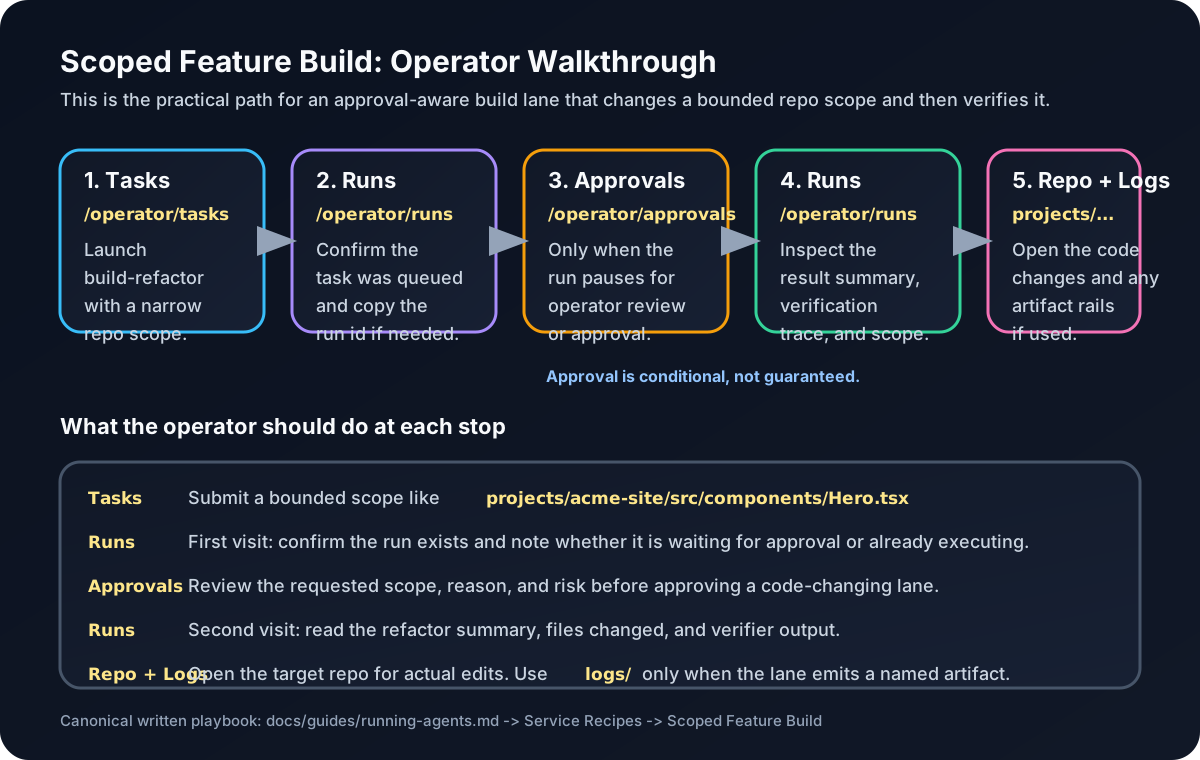
Scoped Feature Build: Tasks -> Runs -> Approvals -> Runs -> Repo/Logs
This is the practical operator path for a bounded code-change lane.
- Open
/operator/tasksand launch thebuild-refactorpayload for a narrow project scope such asprojects/acme-site/src/components/Hero.tsx. - Open
/operator/runsimmediately after launch and confirm the run exists. This is where you first see whether the task is queued, executing, or waiting for approval. - If the run is gated, open
/operator/approvalsand review the request. Use this stop to decide whether the scope, intent, and risk are acceptable. - Return to
/operator/runsafter approval to inspect the final outcome: files changed, confidence, verification summary, and any verifier-backed evidence. - Open the target repo under
workspace/projects/...to inspect the real code edits. Only checklogs/if the lane wrote a named artifact; forbuild-refactor, the main output is usually the repo itself plus the run record.
What to expect:
Tasksis the launch surfaceRunsis the main output surfaceApprovalsis conditional and only matters when the lane pauses for review- the repo itself is the deliverable for code-edit lanes
logs/is secondary unless the task explicitly writes artifacts
Host Service Checks
curl -fsS -H "Authorization: Bearer $API_KEY" http://127.0.0.1:3312/api/agents/overview | jq '.agents[] | {id, serviceExpected, lifecycleMode, hostServiceStatus, serviceUnitName}'
curl -fsS -H "Authorization: Bearer $API_KEY" http://127.0.0.1:3312/api/health/extended | jq '.workers'
On Linux hosts, you can then confirm unit state directly:
systemctl show doc-specialist.service reddit-helper.service --property=Id,LoadState,ActiveState,SubState,UnitFileState --no-pagerIf a service-expected agent is missing or stopped, the orchestrator should also surface that as observed incident pressure.
Manual Invocation
Manual invocation is still mainly a debugging path:
cd agents/doc-specialist
npm install
tsx src/index.ts --payload /path/to/payload.json > /path/to/result.json
Debugging Agent Issues
If an agent fails:
Check orchestrator log:
bashgrep "agent spawn error" logs/orchestrator.logCheck temp payloads (if not cleaned up):
bashls -la /tmp/orchestrator-payload-* cat /tmp/orchestrator-payload-* | jqRun agent manually:
bashcd agents/doc-specialist tsx src/index.ts --payload test-payload.jsonCheck agent logs (if it writes them):
bashcat logs/agents/{agent_name}.log
See Task Types for what triggers which agents.